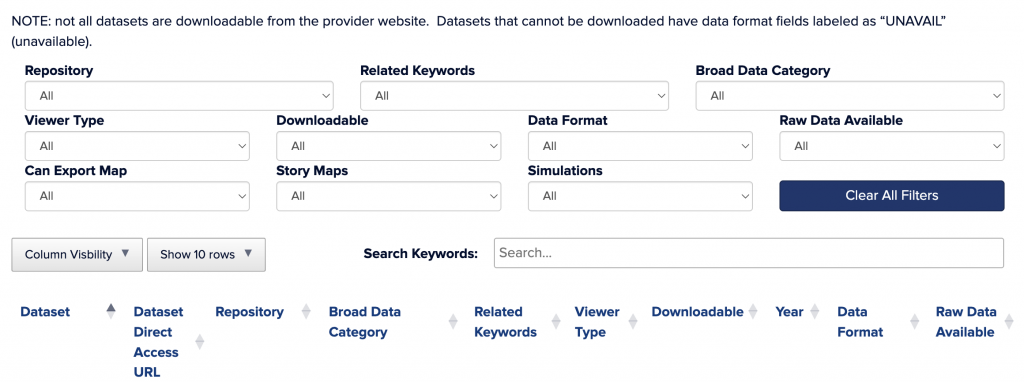
Use any of the drop-down menus to filter data within the data navigator. Drop-down menus are described in further detail below. You can use multiple dropdowns at once to narrow your search. The “Search Keywords” box applies to all column headings. To use multiple keywords at once, separate each keyword with a single space.
Use the “Column Visibility” drop-down menu to change the display of filtered data and show only columns relevant to your search. Use the “Show __ Rows” drop-down menu to change the number of rows of data displayed on a single page of filtered data. Click on the provider name of a row of data to see the dataset’s complete metadata in a pop-up window. Hover over column headings to see a brief description of the heading’s meaning.
Please cite the provider as the source for any data used in publications. The creation and maintenance of this data navigator is funded by the United States Environmental Protection Agency under assistance agreement LI-00A00820-0 with the Connecticut Department of Energy and Environmental Protection. The contents of this site do not necessarily reflect the views and policies of the Environmental Protection Agency, nor does the EPA endorse trade names or recommend the use of commercial products mentioned in this site. The initial LIS Data Support Tools survey and workshop were sponsored by the Long Island Sound Cable Fund and the Long Island Sound Study through contract #2023-190 to the University of Connecticut.
Provider: This is the organization, agency, or website hosting the dataset.
Dataset: This is the title of the data layer as it is written on the provider’s website.
Broad Data Category: This is a general categorization of the type of data the dataset contains.
Year: Generally, this is the most recent data collection or data update year listed on the provider’s site for the dataset. Users should confirm the accuracy of this information using the provider’s site if they anticipate using the data, as providers differ in their labeling of dataset year based on dataset updates, original creation year, etc.
Viewer Type: This is the type of viewer available on the provider’s site for viewing the dataset before downloading it. Dynamic maps are maps with layers that can be manipulated to suit the user’s needs. Static maps are map images that cannot be manipulated. Graphics are screenshots or images of the layer without geographic references.
Downloadable: This refers to whether the user can download the GIS layer or data onto their personal device. “Yes with account” means that the user must create an account on the site before they can download data. “Yes by request” means the site has a request form they can use to have data emailed to them at a later date.
Data Format: This tells which formats the data can be downloaded in if the data is downloadable. If data is not downloadable, it is labeled “UNAVAIL” (unavailable).
Raw Data Available: This tells whether the raw data used to create the data layer is available on the provider’s site. If the raw data is available or the dataset itself is raw data, this field is labeled “Yes.” If the dataset is a data product created from raw data the user cannot view, this field is labeled “No.”
Website: This is the link to the page where the specific dataset is hosted.
Can Export Map: This specifies whether a map the user creates on the site can be exported and saved on the user’s personal device. If maps cannot be created on the site, this field is listed as “No.”
Story Maps: This field tells whether the provider offers Story Maps anywhere on their website. Story Maps are educational tools that often explain scientific concepts to a general audience.
Simulations: This field tells whether the provider’s site offers simulations, including models, scenario builders, or predictions.
Related Keywords: This is a list of keywords that apply to the dataset to aid in dataset findability. These are generally nested within the broad data category.
Provider Main Page: This is the main welcome page of the provider’s website. It will not direct the user to the specific dataset.
The list of providers and links on this website are for accessing useful data sources. This information is subject to change, and we do not attest to data quality. Each provider addresses their own quality control and data accuracy. Please consult metadata and provider contacts for questions.